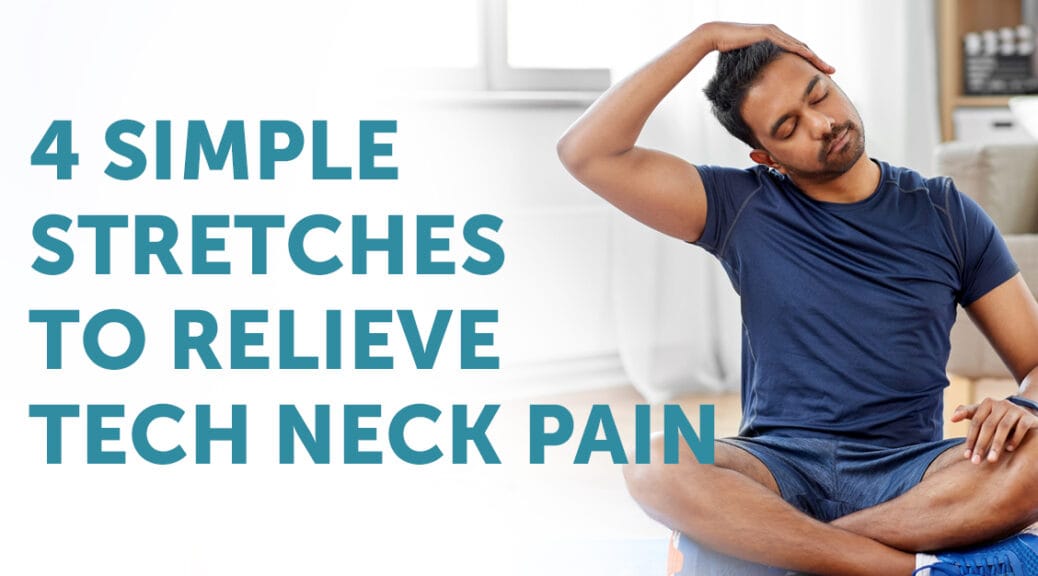
Tech neck is a modern health issue caused by spending long hours looking down at smartphones, laptops, and other digital devices. The condition occurs when the neck bends forward for extended periods, placing excessive strain on the muscles, ligaments, and spine. Over time, this posture can lead to stiffness, pain, headaches, and reduced mobility. Tech neck stretches are simple exercises designed to relieve tension, improve posture, and reduce discomfort caused by prolonged screen use.
In today’s digital world, many people spend several hours each day working on computers or scrolling through mobile devices. While technology offers many benefits, poor posture during device use can create physical stress on the neck and shoulders. Performing regular stretches can help restore proper alignment, relax tight muscles, and prevent long-term problems associated with tech neck.
What Is Tech Neck?
Tech neck refers to neck pain and strain caused by frequently looking down at electronic devices. When the head tilts forward, the weight placed on the cervical spine increases significantly. The human head typically weighs around 10 to 12 pounds in a neutral position, but when tilted forward, the effective pressure on the neck muscles increases dramatically.
This repeated strain can cause muscle fatigue, tightness, and discomfort in the neck, shoulders, and upper back. Over time, poor posture may contribute to chronic pain or reduced mobility if not addressed through proper posture and stretching exercises.
Common Symptoms of Tech Neck
People experiencing tech neck may notice several physical symptoms. These symptoms can develop gradually and become more noticeable after long periods of device use.
- Neck stiffness and soreness
- Shoulder tension
- Headaches
- Upper back pain
- Reduced neck mobility
- Fatigue in neck muscles
If these symptoms appear regularly, incorporating tech neck stretches into a daily routine can help relieve discomfort and improve posture.
Why Tech Neck Stretches Are Important
Stretching helps relax tight muscles, improve flexibility, and restore proper posture. When performed consistently, tech neck stretches can reduce muscle tension and improve circulation in the neck and upper back.
These exercises also encourage awareness of posture. By strengthening and stretching the muscles that support the neck and shoulders, individuals can maintain healthier alignment when using devices.
Neck Tilt Stretch
The neck tilt stretch is a simple exercise that helps release tension in the side muscles of the neck. It is especially helpful for people who feel tightness around the shoulders and upper neck.
To perform this stretch:
- Sit or stand with your back straight.
- Slowly tilt your head toward one shoulder.
- Hold the position for 15 to 20 seconds.
- Return to the center and repeat on the opposite side.
This stretch helps lengthen the muscles that become tight when the head remains in a forward position for long periods.
Chin Tuck Exercise
The chin tuck is one of the most effective exercises for correcting forward head posture caused by tech neck. This movement strengthens the muscles that support the cervical spine.
To perform a chin tuck:
- Sit or stand with your spine upright.
- Gently pull your chin straight back as if creating a double chin.
- Keep your eyes facing forward.
- Hold the position for five seconds.
- Repeat several times.
This exercise helps realign the head with the spine and reduces strain on neck muscles.
Shoulder Roll Stretch
Shoulder rolls help relieve tension in the shoulders and upper back, which often become tight due to prolonged device use.
To perform shoulder rolls:
- Sit or stand comfortably.
- Lift your shoulders upward toward your ears.
- Roll them backward in a circular motion.
- Repeat the movement several times.
This movement improves circulation and relaxes the muscles surrounding the neck and shoulders.
Upper Trapezius Stretch
The upper trapezius muscles extend from the neck to the shoulders and often become tight during prolonged screen use. Stretching these muscles can relieve tension and improve comfort.
To perform this stretch:
- Sit upright in a comfortable position.
- Place one hand on the side of your head.
- Gently pull your head toward your shoulder.
- Hold the stretch for 15 to 20 seconds.
- Repeat on the other side.
This stretch targets the muscles responsible for supporting the head and shoulders.
Chest Opener Stretch
Looking down at screens often causes the shoulders to round forward, tightening the chest muscles. A chest opener stretch helps counteract this posture and encourages better alignment.
To perform this stretch:
- Stand with your feet shoulder-width apart.
- Clasp your hands behind your back.
- Straighten your arms and gently lift them upward.
- Open your chest and hold for 15 to 20 seconds.
This movement helps stretch the front of the shoulders and improves posture.
Neck Rotation Stretch
The neck rotation stretch improves flexibility and mobility in the cervical spine.
To perform this exercise:
- Sit or stand upright.
- Slowly turn your head to one side.
- Hold the position for 10 seconds.
- Return to center and repeat on the other side.
This stretch helps loosen stiff neck muscles and improves range of motion.
How Often to Perform Tech Neck Stretches
For best results, tech neck stretches should be performed regularly throughout the day. People who work on computers or use smartphones frequently may benefit from stretching every one to two hours.
Taking short breaks from screens also helps prevent muscle fatigue. Standing up, moving around, and performing simple stretches can significantly reduce the risk of developing chronic neck pain.
Improving Posture to Prevent Tech Neck
In addition to stretching exercises, maintaining good posture is essential for preventing tech neck. Keeping devices at eye level helps reduce the need to tilt the head downward.
When using a computer, the screen should be positioned at a comfortable height so the head remains in a neutral position. Sitting with the back supported and shoulders relaxed also helps maintain proper alignment.
Other Lifestyle Tips for Reducing Tech Neck
Several lifestyle habits can help reduce the risk of developing tech neck symptoms. These habits encourage better ergonomics and healthier device use.
- Take regular breaks from screens.
- Adjust device height to eye level.
- Strengthen neck and upper back muscles.
- Practice ergonomic workstation setup.
- Limit long periods of phone use.
Combining these habits with regular stretching can significantly reduce neck strain.
The Long-Term Benefits of Stretching
Performing tech neck stretches regularly can lead to long-term improvements in flexibility, posture, and muscle health. These exercises help keep the neck and shoulders relaxed while reducing the risk of chronic pain.
Healthy posture also supports better breathing, improved circulation, and increased comfort during daily activities. Over time, maintaining proper alignment can prevent many common musculoskeletal problems associated with modern digital lifestyles.
Conclusion
Tech neck stretches are simple yet effective exercises that help relieve neck pain and muscle tension caused by prolonged device use. As smartphones, computers, and tablets continue to play an important role in daily life, maintaining healthy posture and performing regular stretches becomes increasingly important.
By incorporating these stretches into a daily routine and practicing good ergonomic habits, individuals can reduce discomfort, improve posture, and protect their neck and spine from the long-term effects of tech neck.

As a digital marketer, she has received multiple international awards, including Campaign of the Year at the 2023 European Content Awards and Best Use of Content Marketing at the 2022 Global Search Awards. Nicai holds an MSc in Marketing (First Class Honours) from the UCD Smurfit Graduate Business School and she has also completed the Artificial Intelligence Programme at Oxford University’s Saïd Business School. She is also a contributing writer for publications such as Entrepreneur and Esquire.