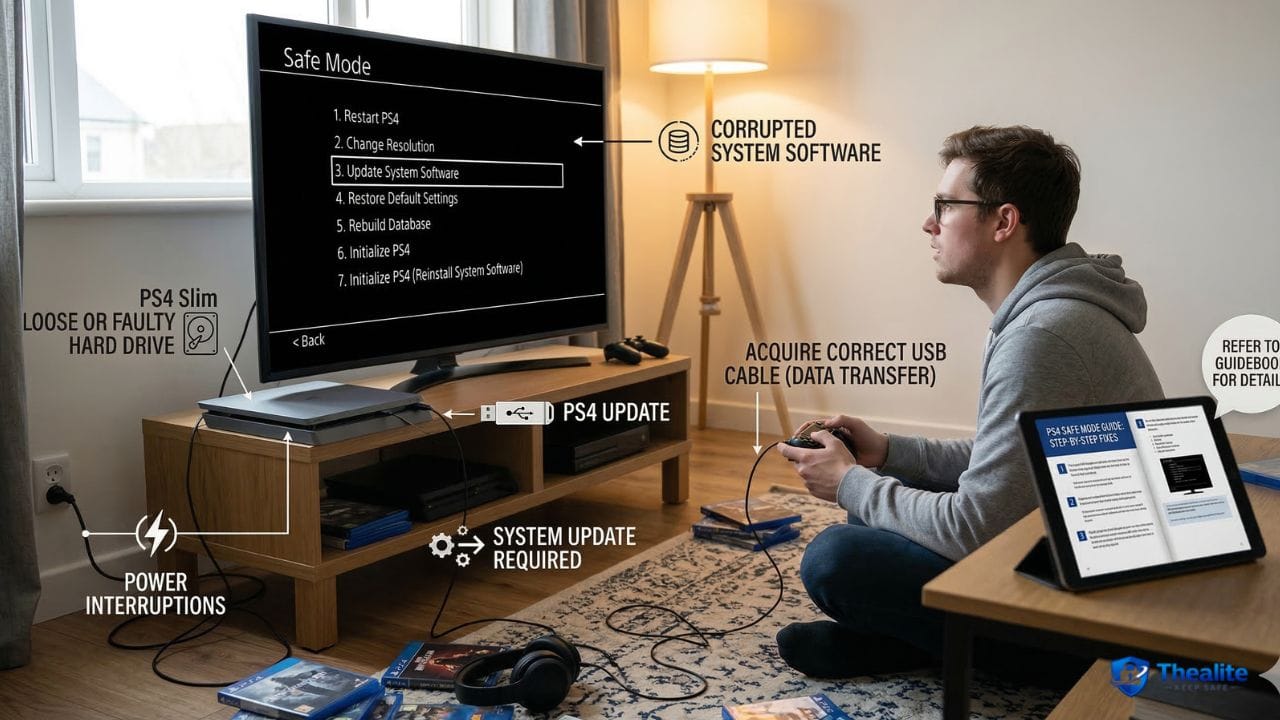
Sitting down to relax with your favorite video game only to be greeted by a stark black screen with white text can be incredibly frustrating. Instead of loading the familiar dashboard, your console asks you to connect a controller using a USB cable. If you are stuck staring at this menu and asking yourself, “Why does my PS4 keep going into safe mode?”, you are not alone. This is one of the most common issues PlayStation users face. While it can look intimidating and feel like your console is broken, this diagnostic screen is actually the system’s way of protecting itself from severe data corruption or hardware failure. By understanding what triggers this mode and following some safe, step-by-step troubleshooting habits, you can often get your console back up and running without losing your precious saved data.
What PS4 Safe Mode Means
Safe Mode is a built-in diagnostic tool on the PlayStation 4, functioning very much like Safe Mode on a Windows PC or a Mac. It boots the console with the absolute minimum required functionality, bypassing the normal operating system. The purpose of this mode is to allow you to repair database errors, install critical firmware updates via a USB drive, or reset the system if the main software becomes too corrupted to load normally. It is a safety net designed to help you fix problems, not a punishment.
Why Does My PS4 Keep Going Into Safe Mode After Restarting?
If you restart your console and it continuously boots back into this diagnostic menu, it means the system cannot successfully load its core operating software. This “safe mode loop” indicates a roadblock that the console cannot fix on its own. The problem usually boils down to a few specific hardware or software failures that interrupt the boot sequence.
Common Causes: Power Interruption, Storage Problems, and Loose Cables
The most frequent culprit is a sudden power loss. If your home loses power or you accidentally unplug the console while it is in Rest Mode, the system does not get the chance to save its background data properly, leading to software corruption. Other common causes include a failed system update (often caused by internet dropping out mid-download), loose HDMI or power cables that disrupt the startup check, or a failing internal hard drive. Just as you research how to keep lithium batteries safe by preventing sudden power surges and overheating, you must protect your console’s delicate storage drive from sudden power drops.
Easy Checks to Try First
Before assuming the worst, start with the simplest solutions. Turn the console completely off, unplug the power cord from the back of the machine, and leave it alone for 20 minutes. This allows the internal power supply to completely drain. While you wait, check your HDMI cable and make sure it is firmly seated in both the TV and the console. Sometimes, simply plugging it back in and selecting “Restart PS4” (Option 1 on the menu) is enough to clear a minor glitch.
When Safe Mode is Normal vs. When It Keeps Looping
Seeing Safe Mode once after a thunderstorm knocks out your neighborhood’s power is completely normal. The console will usually run a quick storage check, restart, and return to the main menu. However, if you are stuck in a loop where every restart brings you right back to the black screen, you have a persistent error that requires manual intervention.
How to Reduce the Risk of Data Loss
A Safe Mode loop puts your saved games and screenshots at risk. To protect yourself, make it a habit to regularly back up your game saves to the PlayStation Plus cloud or a physical USB thumb drive. Protecting your digital property requires proactive thinking. Just as you take time to learn how to keep your identity safe online, or figure out how to keep important documents safe at home in a secure lockbox, backing up your digital media ensures you never lose hundreds of hours of gaming progress to a simple hard drive glitch.
When to Rebuild Database, Update Software, or Get Repair Help
If a simple restart doesn’t work, you will need to use the other options on the menu:
- Update System Software (Option 3): Sometimes the console just needs a fresh copy of the latest update. You can download the update file from the official PlayStation website onto a USB drive and install it from here.
- Rebuild Database (Option 5): This is a safe and highly recommended step. It works like defragmenting a PC. It reorganizes your hard drive, clears out corrupted background data, and often fixes the loop without deleting your games or saves.
If neither of these options works, and your console still loops, you may be dealing with hardware failure that requires professional repair or a hard drive replacement.
Signs the Hard Drive May Be Failing
If you frequently ask yourself, “why does my ps4 keep going into safe mode,” your internal hard drive might be on its last legs. Warning signs of a dying hard drive include loud clicking or grinding noises coming from the console, severe freezing during gameplay, textures taking a long time to load, and repeated corrupted data error messages on your home screen.
Common Mistakes People Make When Troubleshooting PS4 Safe Mode
The absolute biggest mistake users make is hastily selecting “Initialize PS4” (Option 6 or 7). Initializing the console acts as a complete factory reset. It will permanently wipe all your games, saves, themes, and user profiles from the hard drive. Never select this option unless you have exhausted all other troubleshooting steps and are prepared to lose your local data. If you share the console with family, ensure you know how to keep kids safe online by managing their profiles, and teach them to never click around the Safe Mode menu without adult supervision.
Simple Habits That May Help Prevent the Issue From Happening Again
Preventing Safe Mode loops comes down to good digital hygiene. Always turn off the console properly using the controller or the power button on the front panel until you hear the beep. Never simply yank the power cord out of the wall while the console is in Rest Mode. If you are packing your console for a trip—while also planning how to keep money safe while traveling—ensure the PS4 is fully powered down before putting it in your bag. Finally, plug your PS4 into a high-quality surge protector rather than directly into a wall outlet to protect it from sudden electrical spikes.
Frequently Asked Questions (FAQ)
Why does my PS4 keep going into safe mode?
Your PS4 keeps going into safe mode because it is failing to boot its normal operating system. This is typically caused by a corrupted system update, sudden power loss, loose cables, or a failing internal hard drive.
What causes a PS4 safe mode loop?
A loop happens when the console encounters a critical error it cannot bypass during startup. The most common causes are corrupted software files that need to be manually reinstalled or physical damage to the internal hard drive.
Can a bad hard drive cause PS4 safe mode?
Yes, a bad or failing hard drive is a leading cause of repeated Safe Mode boots. If the console cannot read the sector of the drive where the operating system lives, it will default to the diagnostic menu.
Does unplugging a PS4 cause safe mode?
Unplugging a PS4 while it is turned on or in Rest Mode can easily trigger Safe Mode. It disrupts the system while it is reading or writing data, which often results in software corruption.
Will safe mode delete my games?
Simply entering Safe Mode or selecting “Restart PS4” or “Rebuild Database” will not delete your games. However, if you choose “Initialize PS4” (Options 6 or 7), it will completely erase all data on the console.
When should you rebuild database on PS4?
You should rebuild the database if your console is running slowly, if games are crashing frequently, if your home screen menus are lagging, or as a first step to escape a Safe Mode loop.
How do you know if a PS4 hard drive is failing?
Signs of a failing hard drive include repeated Safe Mode loops, frequent “corrupted data” errors, games taking unusually long to load, system freezing, and audible clicking or grinding noises from the console.
Should you repair or replace a PS4 with repeated safe mode problems?
If the issue is just the hard drive, it is usually much cheaper to repair the PS4 by simply buying and installing a replacement internal hard drive yourself, rather than replacing the entire console.

As a digital marketer, she has received multiple international awards, including Campaign of the Year at the 2023 European Content Awards and Best Use of Content Marketing at the 2022 Global Search Awards. Nicai holds an MSc in Marketing (First Class Honours) from the UCD Smurfit Graduate Business School and she has also completed the Artificial Intelligence Programme at Oxford University’s Saïd Business School. She is also a contributing writer for publications such as Entrepreneur and Esquire.