Every time you log into a bank account, shop online, or check your personal email, you are handling highly sensitive digital information. In today’s connected world, relying on weak, repeated passwords or carelessly saving your personal data is a recipe for disaster. Whether it is your financial details or your actual identity, securing your digital footprint is no longer optional—it is a daily necessity. If you are wondering how to keep your identity safe online, the very first step is locking down the data that grants access to your life.
Why Password Safety Matters
A single compromised password can create a devastating domino effect. Cybercriminals often use automated software to test stolen passwords across hundreds of popular websites simultaneously. If you use the same password for your email and your banking app, a data breach on a random shopping forum could instantly put your life savings at risk. Securing your passwords builds a strong wall between your private life and online scammers.
How to Keep Passwords Safe and Organized
With dozens—sometimes hundreds—of accounts to manage, figuring out how to keep passwords safe and organized can feel overwhelming. The key is finding a system that balances strict security with everyday convenience. You need to know exactly where your login details are without leaving them exposed to prying eyes or hackers.
Best Way to Organize Passwords
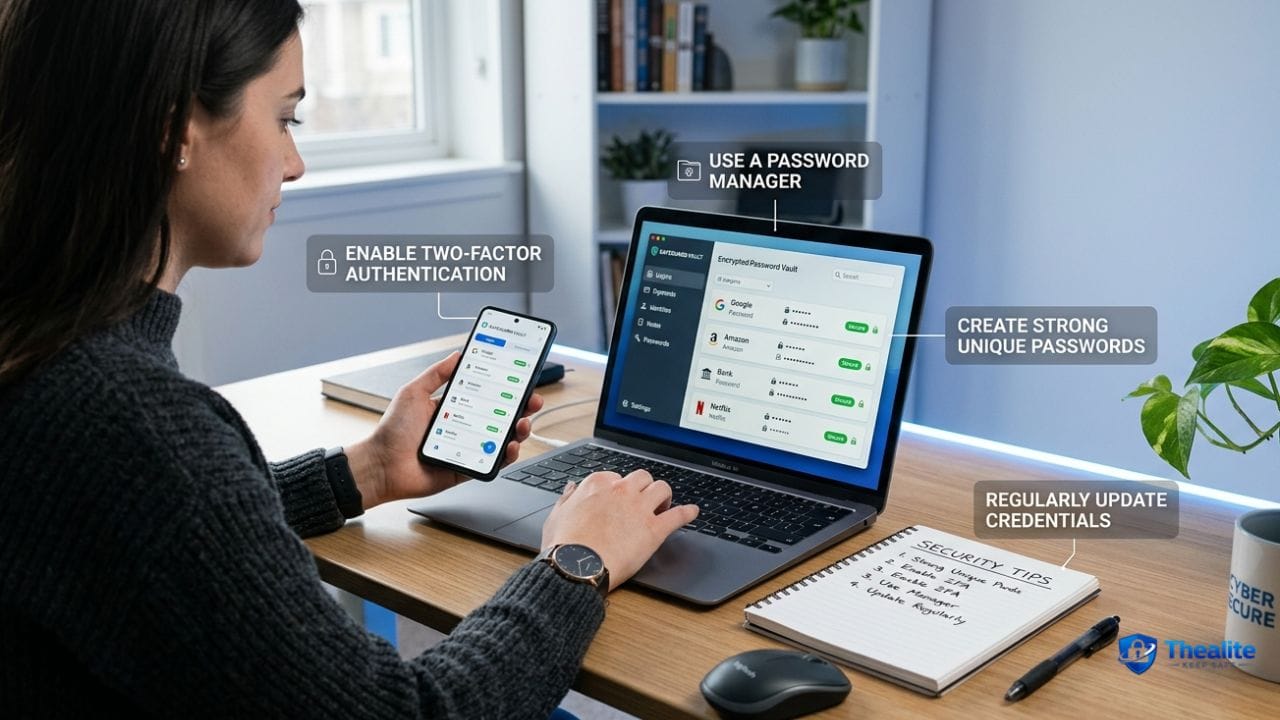
The most secure and practical method for organizing your digital keys is using a dedicated password manager. These tools act as a heavily encrypted digital vault. You only need to memorize one very strong “master password.” From there, the software automatically generates, securely stores, and autofills complex passwords for all your other accounts.
Password Manager vs Notebook vs Browser Saving
People often debate the best storage method. Here is how the most common strategies stack up:
- Browser Saving: Letting Chrome or Safari save your passwords is very convenient, but it is tied to your device login. If someone gains access to your unlocked computer, they can easily view your saved passwords.
- Physical Notebook: Writing passwords down keeps them completely offline, which protects against remote internet hackers. However, if you lose the notebook or experience a break-in, your accounts are compromised. If you choose this traditional route, you must know how to keep important documents safe at home using a fireproof lockbox or a hidden home safe.
- Password Manager: This remains the gold standard. It encrypts your data securely and syncs safely across your phone and computer, giving you both top-tier security and convenience.
How Do You Keep Your Password Safe?
So, practically speaking, how do you keep your password safe from modern online threats? It goes beyond just picking a clever word. You need strict digital habits.
- Enable Two-Factor Authentication (2FA): Always add a second layer of security. Even if a hacker guesses your password, they cannot log in without the temporary code sent to your phone or authenticator app.
- Never Share Your Logins: Treat your passwords like your toothbrush—do not share them with anyone, and never send them over text message or email.
- Avoid Unsecured Cloud Documents: You might wonder, is it safe to keep passwords in Google Docs? The short answer is no. Standard cloud documents lack the strict, end-to-end encryption required for sensitive login credentials.
How to Create Strong Passwords
Avoid using common dictionary words, pet names, or birthdates. Instead, use a “passphrase.” A passphrase is a sequence of random words (like “PurpleCoffeeGuitarSunset!”) that is long and easy for you to remember, but mathematically impossible for a computer program to guess quickly. Always include a mix of uppercase letters, lowercase letters, numbers, and symbols.
How to Keep Your Social Security Number Safe
Your Social Security Number (SSN) is the master key to your identity in the United States. Unlike a compromised credit card, you cannot easily cancel and replace your SSN if it gets stolen. Knowing how to keep your social security number safe is crucial for preventing severe financial damage.
Safely Store or Avoid Storing Your Social Security Number
To protect this vital nine-digit number, you must be extremely cautious about where it lives physically and digitally:
- Don’t carry the card: Never keep your SSN card in your everyday wallet unless you explicitly need it that day for a new job or a government office visit. Keep it locked in a secure safe at home.
- Keep it off your devices: Do not take a photo of your SSN card or type the number into your phone’s notes app. If you are learning how to keep my phone safe from hackers, a massive part of that is ensuring no high-value data is sitting unencrypted on your device.
- Question why it’s needed: Doctors and dentists often ask for your SSN on intake forms, but they rarely actually need it for medical care. Always ask if you can leave that field blank or provide an alternative form of ID.
How to Protect Sensitive Digital Information
Passwords and SSNs are just two pieces of the digital puzzle. Protecting your overall sensitive information requires adopting a few broader daily habits.
- Keep your computer and smartphone software updated to patch known security holes.
- Avoid using public Wi-Fi at coffee shops or airports to check bank accounts or log into sensitive portals.
- Learn to spot phishing emails that try to trick you into clicking fake links and handing over your details voluntarily.
Common Mistakes to Avoid
Even cautious people make errors. Make sure you are not making these critical mistakes:
- Reusing the exact same password across multiple high-risk websites.
- Saving highly sensitive personal data in unencrypted text files or draft emails.
- Ignoring data breach notifications from companies you do business with.
What to Do if Your Password or SSN is Exposed
If you receive an alert that your password was part of a data breach, do not panic. Immediately log into that specific account and change the password. If you made the mistake of reusing that password anywhere else, change it on those sites immediately as well.
If your SSN is exposed, the stakes are much higher. You should immediately place a fraud alert on your credit reports by contacting one of the three major credit bureaus (Equifax, Experian, or TransUnion). You should also seriously consider freezing your credit entirely to prevent scammers from opening new loans or credit cards in your name.
Frequently Asked Questions
How do you keep your password safe?
To keep your password safe, use a unique, complex passphrase for every single account. Always enable two-factor authentication (2FA) wherever possible, and never share your passwords via text message, email, or unencrypted chat apps.
What is the safest way to organize passwords?
The safest way to organize passwords is by using a reputable, encrypted password manager. It acts as a digital vault that stores all your login credentials securely, meaning you only have to remember one strong master password.
Should you save passwords in your browser?
While saving passwords in your browser is convenient, it is not the most secure option. If someone gains physical access to your unlocked computer or device, they can easily access your saved passwords. A dedicated password manager is much safer.
How to keep your social security number safe?
To keep your social security number safe, never carry the physical card in your wallet, do not store pictures of it on your smartphone, and push back when businesses or medical offices ask for it unnecessarily. Always shred documents containing your SSN before throwing them away.
What should you do if someone gets your social security number?
If your SSN is stolen or exposed in a breach, immediately contact the major credit bureaus (Equifax, Experian, or TransUnion) to place a fraud alert or a complete freeze on your credit report. You should also closely monitor your financial accounts for unauthorized activity.
Is a password manager better than writing passwords down?
Yes, a password manager is generally better than writing passwords down. While a physical notebook cannot be hacked over the internet, it can be easily lost, stolen, or destroyed. A password manager provides strong encryption, easy backups, and cross-device syncing.

As a digital marketer, she has received multiple international awards, including Campaign of the Year at the 2023 European Content Awards and Best Use of Content Marketing at the 2022 Global Search Awards. Nicai holds an MSc in Marketing (First Class Honours) from the UCD Smurfit Graduate Business School and she has also completed the Artificial Intelligence Programme at Oxford University’s Saïd Business School. She is also a contributing writer for publications such as Entrepreneur and Esquire.